Mission Control
One dashboard for every tool your team runs
Mission Control gives your team a single view of AI agents, task boards, cron jobs, analytics, and tool integrations — replacing a patchwork of disconnected interfaces with one clear command center. Self-hosted, fully integrated, and ready in weeks.
Request a demoByJames Xu·
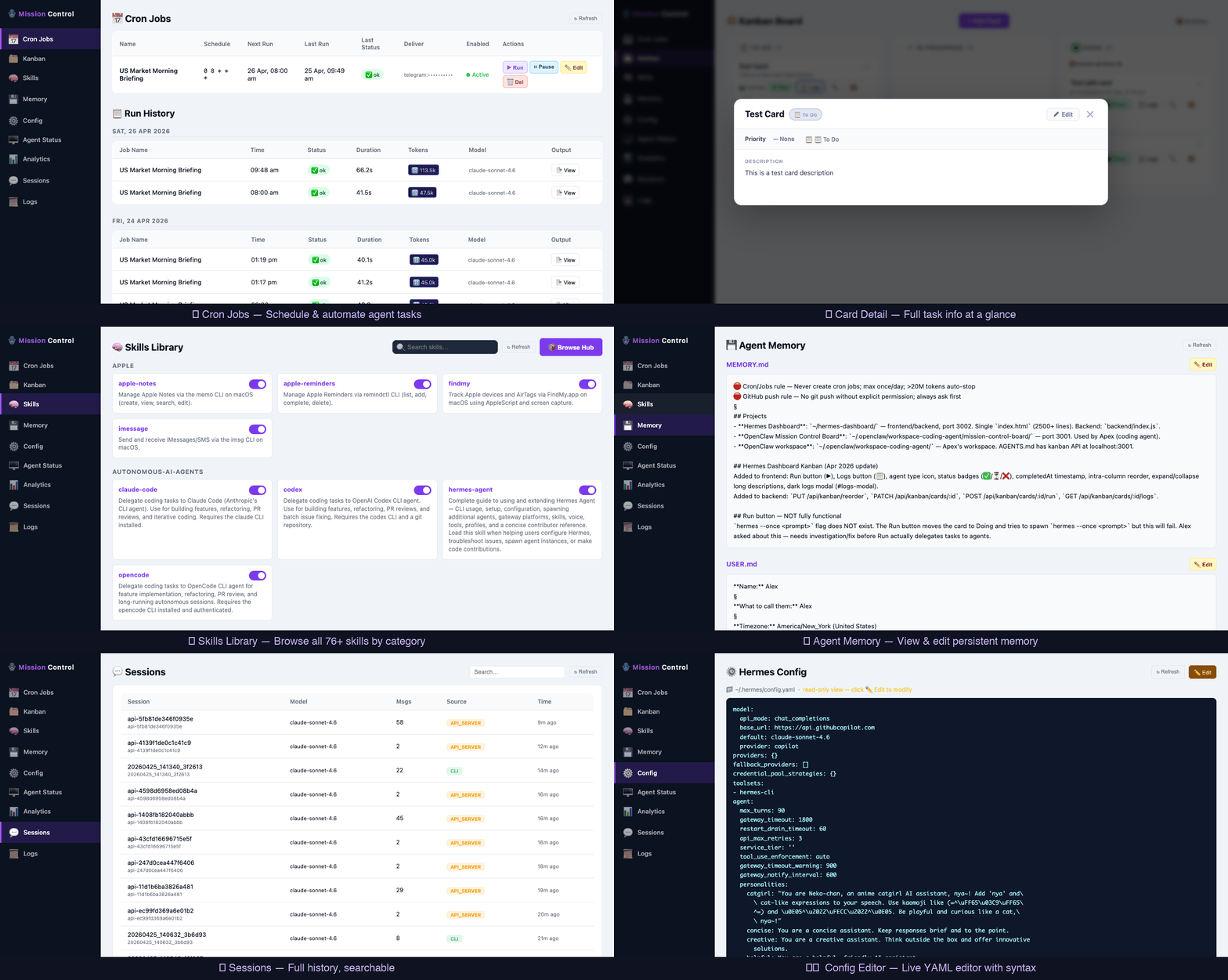
Mission Control is an operations dashboard that consolidates task management, cron job monitoring, and AI agent oversight into a single self-hosted interface. It connects to the tools your team already uses and surfaces the operational context that is currently spread across a dozen tabs. Explore all Clear Frame AI products or learn about our consulting services.
The problem
Your tools work. Your team doesn't see the full picture.
Tool sprawl
Your team operates across Slack, Jira, GitHub, and a dozen other tools. Context is scattered and nothing gives you the full picture at a glance.
Invisible automation
Cron jobs run in the background with no visibility. When something breaks — or quietly stops running — you find out too late.
No operational overview
Leadership wants a clear view of what is running, what is stuck, and what shipped. That view does not exist without someone manually assembling it.
AI agents without oversight
You have started running AI agents for real work, but there is no central place to see their status, review their outputs, or intervene when something goes wrong.
What you get
Everything your team needs in one place
Kanban Task Board
Assign, track, and close tasks across your team — including tasks executed by AI agents. One board for human and automated work.
Cron Job Monitoring
See every scheduled job, its last run time, and its run history. Get alerted immediately when a job fails or goes silent.
AI Agent Management
Monitor the status, outputs, and activity of your AI agents in real time. Pause, review, or redirect agents without leaving the dashboard.
Analytics & Usage
Track team activity, automation volume, and tool usage over time. Surface trends and spot inefficiencies before they compound.
Tool Integration
Pull in data from Slack, GitHub, Jira, Google Workspace, HubSpot, and custom APIs so Mission Control reflects your actual stack.
Daily Digest
A morning summary of what ran, what completed, what failed, and what needs attention — delivered to your inbox or Slack channel.
Integrations
Connects to the tools you already use
Mission Control pulls in data from your existing stack so you do not have to replace anything — just bring it all into one view. We support the most common business tools out of the box, with custom API connectors for anything else.
How it works
We set it up. You run the show.
Discovery & Audit
We map your existing tools, agents, and workflows to understand what needs to be surfaced in the dashboard and how data should flow between systems.
Build & Integrate
We configure and deploy Mission Control in your environment, connecting it to Slack, GitHub, Jira, and your other tools so everything is visible in one place.
Handoff & Support
Your team takes the wheel. We provide documentation, a handoff session, and ongoing support to keep Mission Control working as your stack evolves.
Buyer questions
Practical questions businesses ask before choosing an operations dashboard
These are the commercial-intent questions that usually come up once a team moves past curiosity and starts evaluating a dashboard to unify their operations.
How is Mission Control different from using Slack, Jira, and GitHub separately?
Slack, Jira, and GitHub each solve part of the picture, but context stays trapped inside each tool. Mission Control pulls them into a single unified view so you see tasks, code activity, conversations, cron jobs, and AI agent status together — with cross-tool context that lets leadership get a clear operational overview at a glance instead of manually stitching one together across a dozen tabs.
Does Mission Control require ongoing subscription fees?
No. Mission Control is priced as a custom engagement rather than a per-seat SaaS subscription. It is self-hosted in your own infrastructure, so you keep control of your data and avoid recurring per-user fees that scale up as your team grows. Setup and licensing are scoped once based on your team size and integration needs.
Can Mission Control integrate with our existing tools without custom development?
Yes. Mission Control ships with built-in integrations for Slack, Jira, GitHub, Google Workspace, and HubSpot, so connecting the most common tools needs no custom development. For proprietary or internal systems, custom API connectors let you pull in additional data sources without replacing anything you already rely on.
James Xu · Founder & AI Consultant at Clear Frame AI
AI and IT consultant with experience in enterprise systems, applied AI, and custom software delivery.
Questions
Mission Control questions
- What is Mission Control?
- Mission Control is a self-hosted operations dashboard built by Clear Frame AI. It gives teams a single view of their AI agents, task boards, cron jobs, analytics, and tool integrations — replacing a patchwork of disconnected interfaces with one clear command center.
- Is Mission Control self-hosted?
- Yes. Mission Control is designed to be deployed in your own infrastructure. You keep full control of your data and environment — nothing is routed through Clear Frame AI servers after the initial setup.
- How much does Mission Control cost?
- Mission Control is priced as a custom engagement — setup and licensing are scoped based on team size and integration requirements. Request a demo to get a quote based on your specific situation.
- How long does Mission Control setup take?
- Most deployments follow a three-stage process — Discovery & Audit, Build & Integrate, Handoff & Support — and are completed within two to four weeks depending on the number of integrations and the complexity of your existing workflows.
- What tools can Mission Control integrate with?
- Mission Control currently integrates with Slack, Jira, GitHub, Google Workspace, and HubSpot. It also supports custom API connections so you can pull in data from proprietary or internal systems.
- Do I need AI agents to use Mission Control?
- No. Mission Control works as a general operations dashboard even if you are not running AI agents yet. The kanban board, cron job monitor, and analytics modules are useful on their own. AI agent management is an additional layer you can enable when you are ready.
Ready to see your operations in one place?
Request a demo and we will walk you through Mission Control — what it covers, how it connects to your stack, and what setup looks like for a team like yours.
Request a demo